> For the complete documentation index, see [llms.txt](https://tumbleds-library.gitbook.io/thetumbleds-library/llms.txt). Markdown versions of documentation pages are available by appending `.md` to page URLs; this page is available as [Markdown](https://tumbleds-library.gitbook.io/thetumbleds-library/chapter-1-load-balancing-algorithm/3-the-birth-of-avgshedder.md).

# 3. The Birth of AvgShedder

Faced with the poor load balancing effect and poor stability of the Pulsar cluster, I initially intended to optimize the existing algorithms. However, after careful algorithm analysis, I realized that this was not a problem that could be solved by simple minor adjustments. Therefore, I began to design a new load balancing algorithm, which is called AvgShedder.

The `AvgShedder` algorithm almost perfectly solves the mentioned problems. Since 2022, it has been running stably in the production environment. In 2024, I successfully pushed this algorithm into the community and merged it into the master branch of the repository. Nowadays, many companies have adopted this algorithm and have given positive feedback, which fills me with a sense of achievement.

The specific algorithm principles will be introduced in detail in the following chapters. Here, we demonstrate its effect by scoring it based on dimensions such as adaptability, stability, and correctness, resulting in the following table:

<table data-header-hidden><thead><tr><th valign="top"></th><th valign="top"></th><th valign="top"></th><th valign="top"></th><th valign="top"></th><th valign="top"></th></tr></thead><tbody><tr><td valign="top">Strategy</td><td valign="top">Adaptability to Heterogeneous Environments (Adaptability)</td><td valign="top">Adaptability to Load Fluctuations (Stability)</td><td valign="top">Over Placement (Correctness)</td><td valign="top">Over Unloading (Correctness)</td><td valign="top">Speed</td></tr><tr><td valign="top">ThresholdShedder + LeastResourceUsageWithWeight</td><td valign="top">Fair</td><td valign="top">Good</td><td valign="top"><strong>Poor</strong></td><td valign="top"><strong>Poor</strong></td><td valign="top">Fair</td></tr><tr><td valign="top">UniformLoadShedder + LeastLongTermMessageRate</td><td valign="top"><strong>Poor</strong></td><td valign="top"><strong>Poor</strong></td><td valign="top">Good</td><td valign="top">Good</td><td valign="top">Fair</td></tr><tr><td valign="top">AvgShedder</td><td valign="top">Fair</td><td valign="top">Good</td><td valign="top">Good</td><td valign="top">Good</td><td valign="top">Good</td></tr></tbody></table>

Note: `AvgShedder` implements both the shedding strategy `LoadSheddingStrategy` and the placement strategy `ModularLoadManagerStrategy`. Therefore, we do not need (nor can we) combine it with other algorithms. When using it, the following configurations must be set simultaneously:

```
loadBalancerLoadSheddingStrategy=org.apache.pulsar.broker.loadbalance.impl.AvgShedder
loadBalancerLoadPlacementStrategy=org.apache.pulsar.broker.loadbalance.impl.AvgShedder
```

It can be seen that `AvgShedder` achieves a good level in all aspects and is a load balancing algorithm without obvious weaknesses. This has also been proven in practical applications:

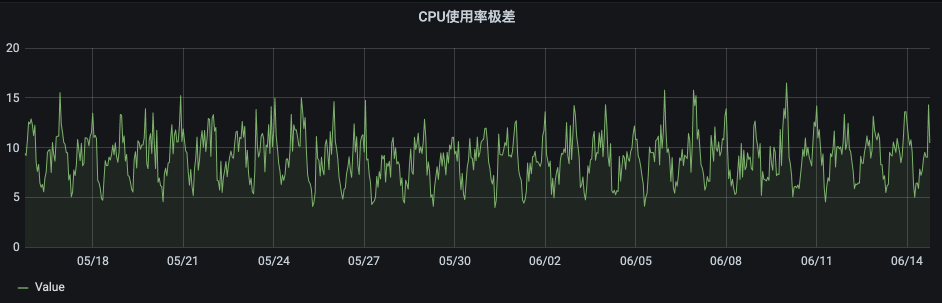
<figure><img src="https://3549286078-files.gitbook.io/~/files/v0/b/gitbook-x-prod.appspot.com/o/spaces%2Fd3bYBC2M7QmbunDfuqpO%2Fuploads%2Fgit-blob-8547ec585f78efa30226e8e990e7af23b8686177%2Fimage.png?alt=media" alt=""><figcaption><p>range of CPU usage</p></figcaption></figure>

The range of resource utilization in the cluster (the difference between the highest and lowest resource utilization rates) remains within 15%, as we use the default configuration `loadEqualrAvgShedderLowThreshold=15`, which controls the threshold for the range of resource utilization that triggers the load balancing algorithm.

Note: The bottleneck of our machine is CPU usage, so we have set up a monitoring chart for the range of CPU usage.

If you want the load in the cluster to be more balanced, you can further reduce it to `loadBalancerAvgShedderLowThreshold=10`, which can ensure that the range of cluster resource utilization does not exceed 10%. But this comes at a cost, **the lower the threshold for triggering, the easier it is to trigger**, sacrificing the stability of cluster traffic.

We have a mechanism to enhance stability. The default configuration `loadBalancerAvgShedderHitCountLowThreshold = 8` determines that the threshold must be triggered **consecutively** eight times before the algorithm is actually executed. Therefore, short-term traffic fluctuations will not mistakenly trigger the execution of the algorithm. **The higher this value is, the higher the stability of the traffic will be.** Of course, this comes at a cost: the higher this value is, the longer it will take to trigger load balancing. Combined with the previously introduced configuration `loadBalancerSheddingIntervalMinutes=1`, which executes a load balancing check every one minute, it means that by default, an imbalance must persist for eight minutes before load balancing is actually triggered.

During scenarios such as rolling restarts of the cluster or broker scaling, there is often a significant difference in load between different brokers. However, we want to achieve load balancing more quickly, which conflicts with the time cost mentioned above. To address this, we introduce another mechanism: when the range of resource usage exceeds 40%, the load balancing algorithm will be executed after only two consecutive triggers. This effectively solves the problem of slow triggering.

```
loadBalancerAvgShedderHighThreshold = 40
loadBalancerAvgShedderHitCountHighThreshold = 2
```

AvgShedder achieves a good balance between stability and timeliness by using both low and high thresholds. For lower trigger thresholds, it uses a higher trigger count requirement to enhance stability; for higher trigger thresholds, it uses a lower trigger count requirement to enhance timeliness.&#x20;

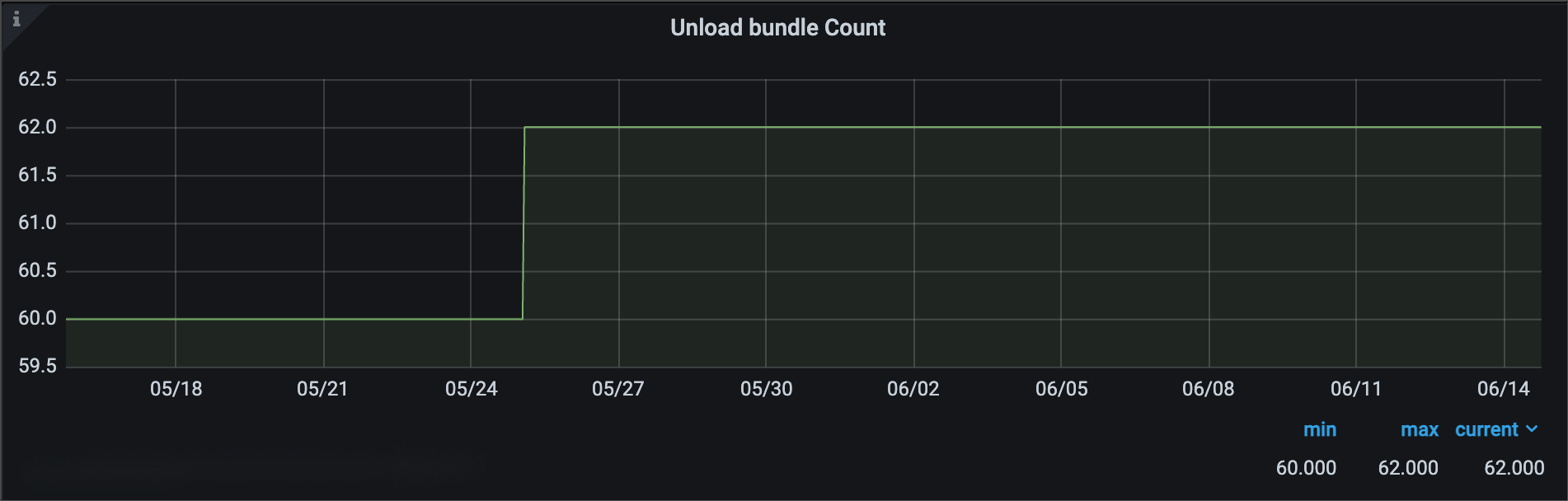
The effect in the production environment is shown in the figure below:

<figure><img src="https://3549286078-files.gitbook.io/~/files/v0/b/gitbook-x-prod.appspot.com/o/spaces%2Fd3bYBC2M7QmbunDfuqpO%2Fuploads%2Fgit-blob-b95ed34223a451c28e415dcaf5988447ba2c8346%2Fimage.png?alt=media" alt=""><figcaption></figcaption></figure>

During the use of old load balancing algorithms, our Pulsar cluster would trigger dozens or even hundreds of load switches daily. Especially during peak traffic periods, frequent mis-triggering of load switches would occur, causing user traffic to be cut off and leading to negative user feedback.

However, after introducing `AvgShedder`, the number of load switch triggers has been significantly **reduced to one or two times per month**. This solution has effectively resolved the issue of traffic stability, and user complaints have completely disappeared.

&#x20;


---

# Agent Instructions
This documentation is published with GitBook. GitBook is the documentation platform designed so that both humans and AI agents can read, navigate, and reason over technical content effectively. Learn more at gitbook.com.

## Querying This Documentation
If you need additional information that is not directly available in this page, you can query the documentation by asking a question.

Perform an HTTP GET request on the following URL with the `ask` and `goal` query parameters:

```
GET https://tumbleds-library.gitbook.io/thetumbleds-library/chapter-1-load-balancing-algorithm/3-the-birth-of-avgshedder.md?ask=<question>&goal=<user_goal>
```

`ask` is the immediate question: it should be specific, self-contained, and written in natural language.
`goal` is what the user is ultimately trying to achieve, the reason they need the answer. Sharing it helps GitBook give you a better, more relevant answer. A goal is most helpful when it describes the outcome the user wants rather than restating the question. For example, with `ask=how do I create an API token`, a goal like `automate deployments from our CI pipeline` lets GitBook tailor the answer to that use case.

The response will contain a direct answer to the question and relevant excerpts and sources from the documentation.

Use this mechanism when the answer is not explicitly present in the current page, you need clarification or additional context, or you want to retrieve related documentation sections.